Deploying a Two-Tier Microsoft PKI for VMware Cloud Foundation
The Components That Matter More Than Installing the CA
Many administrators think deploying PKI means installing Active Directory Certificate Services (AD CS) and clicking through the setup wizard.
That step is actually the easiest part.
The real challenge — especially when integrating with VMware Cloud Foundation (VCF) — is designing the PKI ecosystem around the CA so that certificate requests, issuance, trust, and validation all work reliably.
VCF Operations allows administrators to:
view certificates and certificate alerts
configure a certificate authority
generate CSRs
replace certificates
enable automatic certificate renewal
Broadcom recommends replacing the default certificates deployed with VCF components with trusted enterprise CA-signed certificates to provide secure access to management interfaces.
This article focuses on the architecture and components required for a successful PKI deployment supporting VCF, rather than simply walking through the CA installation wizard.
Key PKI Concepts for VCF Integrations
Before deploying PKI, administrators should understand several key components that affect how certificates are issued and validated.
Many PKI deployments fail not because the CA was installed incorrectly, but because the supporting infrastructure required for certificate validation and distribution was not designed properly.
Systems must be able to:
request certificates
build certificate chains
retrieve issuing CA certificates
verify revocation status
These capabilities depend on AIA, CDP, IIS configuration, and template design.
Authority Information Access (AIA)
Authority Information Access (AIA) identifies where a client retrieves the issuing CA certificate.
When a system receives a certificate, it attempts to build a chain back to a trusted root.
If the issuing CA certificate is not already present locally, the client retrieves it using the AIA URL embedded in the certificate.
Example:
http://pki.company.com/pki/IssuingCA.crtIf this location is unavailable, the certificate chain may fail to build.
This is especially important for appliances and non-domain systems, which often rely entirely on HTTP retrieval rather than Active Directory.
CRL Distribution Point (CDP)
CRL Distribution Point (CDP) identifies where systems retrieve the Certificate Revocation List (CRL).
Example:
http://pki.company.com/pki/IssuingCA.crlThe CRL contains certificates revoked by the CA before expiration.
During certificate validation, systems:
build the certificate chain
download the CRL
confirm the certificate has not been revoked
If the CRL cannot be retrieved, certificate validation may fail.
CertSrv and Basic Authentication
For VCF Operations integration with Microsoft CA, Broadcom specifies that:
The Certification Authority role
The Certificate Authority Web Enrollment role
must be installed on the same server.
VCF Operations communicates with the Microsoft CA through the CertSrv Web Enrollment endpoint.
Example:
https://pki.company.com/certsrvBroadcom documentation also requires enabling Basic Authentication on the CertSrv IIS virtual directory.
This endpoint is used exclusively for certificate enrollment.
Certificate validation uses a different path.
Enrollment vs Validation Endpoints
Certificate enrollment and certificate validation use different endpoints.
FunctionEndpointProtocolPurposeCertificate Enrollment/certsrvHTTPSRequest certificatesCertificate Validation/pkiHTTPRetrieve CA certificates and CRLs
Example endpoints:
https://pki.company.com/certsrv
http://pki.company.com/pki
The /pki location hosts the files required for certificate validation:
RootCA.crt
IssuingCA.crt
IssuingCA.crl
PKI Architecture Overview
A typical enterprise PKI supporting VCF uses a two-tier hierarchy:
Offline Root CA
Enterprise Issuing CA
The Issuing CA hosts the operational services, including IIS, CertSrv, and CRL/AIA publication.
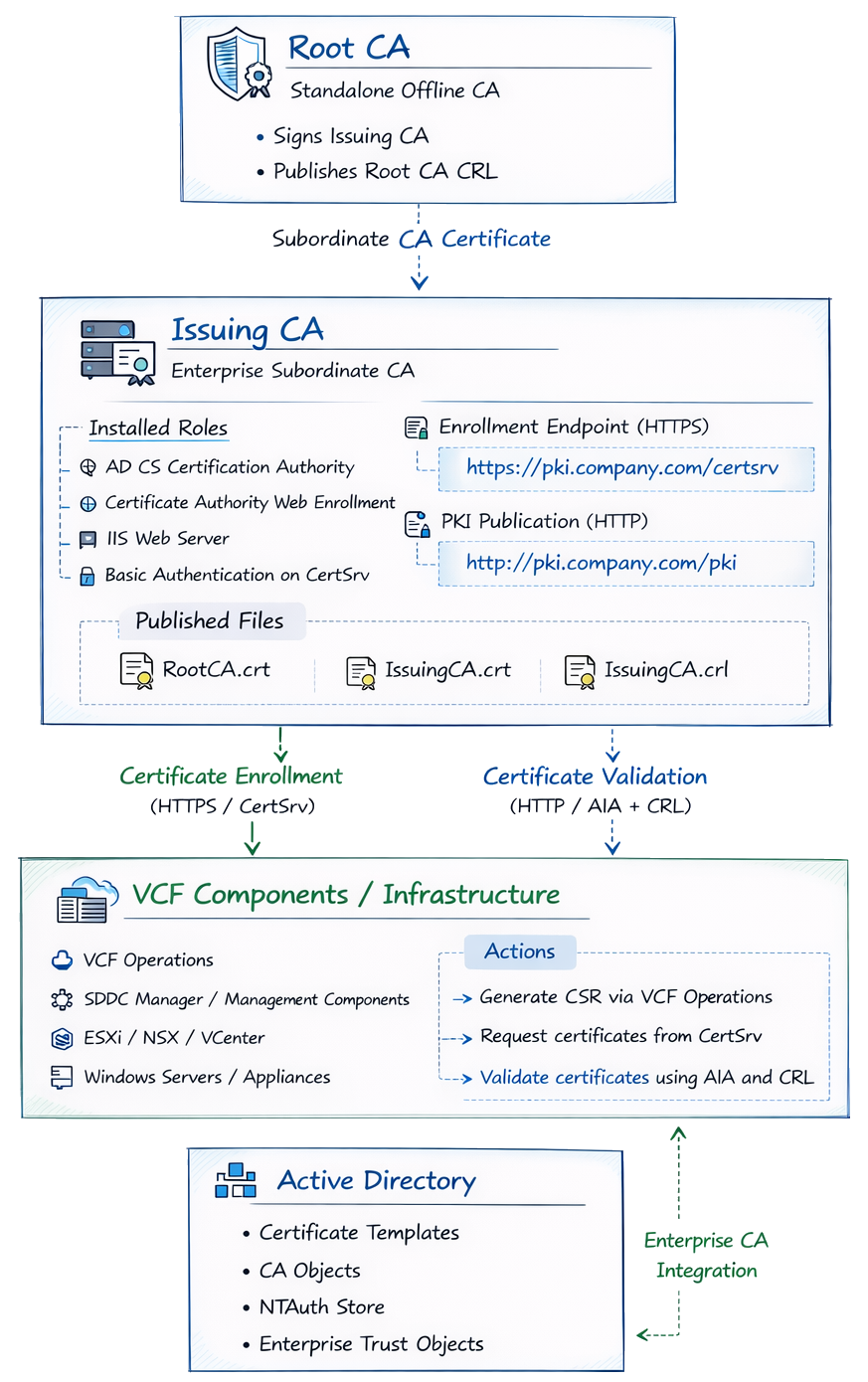
PKI architecture for VMware Cloud Foundation certificate integration.
The issuing CA hosts AD CS, Web Enrollment, and IIS PKI publication endpoints
while the root CA remains offline to protect the trust anchor.
The issuing CA performs daily operations including certificate issuance and CRL publication, while the root CA only signs subordinate CAs and publishes the root CRL.
PKI Design Considerations for VMware Cloud Foundation
Before installing the CA roles, it is important to define several PKI design decisions that will affect how certificates are issued, validated, and maintained over time.
Poor PKI design often leads to operational issues later such as broken certificate chains, unreachable CRLs, or certificate renewal failures.
For environments integrating Microsoft Active Directory Certificate Services with VMware Cloud Foundation, several design principles should be considered.
Use a DNS Alias for PKI Endpoints
One of the most common mistakes in PKI deployments is embedding the physical server hostname in certificate distribution paths.
Instead, create a stable DNS alias such as:
pki.company.comExample DNS mapping:
pki.company.com → issuingca.company.comThis alias can then be used for both certificate enrollment and certificate validation endpoints.
Example endpoints:
https://pki.company.com/certsrv
http://pki.company.com/pki
Using a DNS alias allows administrators to migrate or replace the issuing CA server without breaking certificate distribution URLs embedded in previously issued certificates.
Separate Enrollment and Validation Endpoints
Certificate enrollment and certificate validation use different endpoints.
FunctionEndpointPurposeEnrollment/certsrvCertificate requestsValidation/pkiAIA and CRL retrieval
Example:
https://pki.company.com/certsrvhttp://pki.company.com/pkiKeeping these paths separate simplifies troubleshooting and helps prevent configuration mistakes.
Publish AIA and CRL Using HTTP
Although Active Directory can distribute CA information for domain members, many infrastructure components including appliances and VMware products rely on HTTP access to retrieve certificate chain information.
The issuing CA should therefore publish AIA and CRL information through IIS.
Typical published files include:
RootCA.crt
IssuingCA.crt
IssuingCA.crl
Accessible URLs:
http://pki.company.com/pki/RootCA.crt
http://pki.company.com/pki/IssuingCA.crt
http://pki.company.com/pki/IssuingCA.crl
These URLs become embedded in certificates issued by the CA.
Plan CA Lifetimes Before Installation
CA certificate lifetimes must be determined before installing the CA.
A typical enterprise PKI design might use the following lifetimes:
CA Lifetime
Root CA 20 years
Issuing CA 10 years
This allows the issuing CA to be renewed without replacing the root CA.
The lifetime is configured through CAPolicy.inf and CA registry settings before installation.
Keep the Root CA Offline
The root CA serves as the trust anchor for the entire PKI hierarchy.
For security reasons it should remain offline except during operations such as:
issuing subordinate CA certificates
publishing root CRLs
renewing subordinate CA certificates
This reduces the risk of compromise of the most critical component of the PKI infrastructure.
Use a Dedicated Service Account for VCF Integration
VCF Operations requires a service account to request certificates from the Microsoft CA.
Create a least-privileged account such as:
svc-vcf-caGrant only the required permissions:
CA permissions:
Issue and Manage Certificates
Request Certificates
Template permissions:
Read
Enroll
This ensures VCF can manage certificates without granting excessive administrative rights.
Synchronize Time Across PKI and VCF Systems
Certificate operations rely heavily on accurate system time.
Broadcom recommends verifying time synchronization between:
Microsoft Certificate Authority
SDDC Manager
VCF Operations appliances
All systems should ideally use the same NTP source.
Time drift can cause issues such as:
certificate validation failures
CSR processing errors
incorrect certificate expiration calculations
Certificate Lifecycle for VCF and Microsoft CA
The architecture shows where PKI components live, but it does not fully explain how certificate operations occur.
In practice, VCF depends on two separate workflows:
certificate enrollment
certificate validation
Understanding both flows is critical when troubleshooting Microsoft CA integrations.
Certificate Enrollment Flow
During enrollment, VCF Operations or a managed component generates a CSR and submits it to the Microsoft CA through CertSrv.
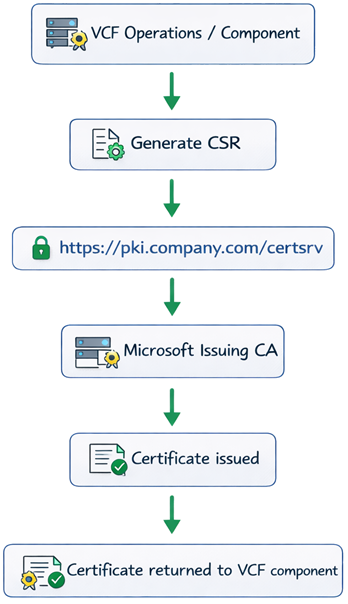
Enrollment depends on:
CertSrv endpoint
certificate template
service account permissions
CA configuration inside VCF Operations
Certificate Validation Flow
Once installed, certificates must be validated.
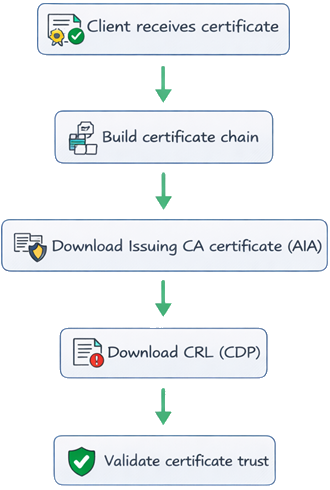
This is why the /pki publication path is critical.
Even if enrollment succeeds, services may fail later if:
the issuing CA certificate cannot be retrieved
the CRL cannot be retrieved
AIA/CDP URLs are incorrect
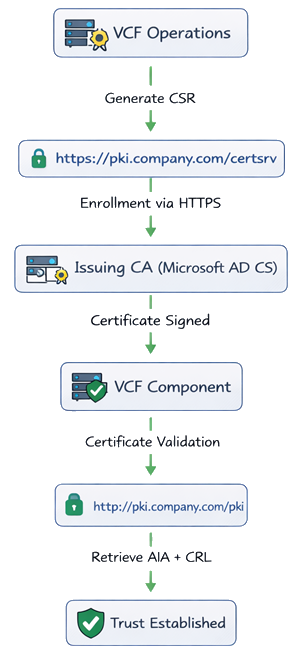
VCF Certificate Flow Diagram
While the architecture shows where PKI components live, the following diagram shows how VMware Cloud Foundation interacts with Microsoft CA during certificate issuance and validation.
CAPolicy.inf and CA Lifetime Design
Before installing the root CA, define CA policy settings using CAPolicy.inf.
C:\Windows\CAPolicy.infExample:
[Version]
Signature="$Windows NT$"

[Certsrv_Server]
RenewalKeyLength=4096
RenewalValidityPeriod=Years
RenewalValidityPeriodUnits=20
CRLPeriod=Years
CRLPeriodUnits=1

[BasicConstraintsExtension]
PathLength=1
Critical=TRUE
Recommended CA Lifetimes
Root CA 20 years
Issuing CA 10 years
Configure issuing CA lifetime before installation:
certutil -setreg CA\ValidityPeriod "Years"
certutil -setreg CA\ValidityPeriodUnits 10
Publishing CA Certificates and CRLs
CA artifacts are stored in:
C:\Windows\System32\CertSrv\CertEnrollExample files:
Contoso-IssuingCA.crt
Contoso-IssuingCA.crl
Publish them through IIS:
C:\inetpub\wwwroot\pkiFinal published files:
RootCA.crt
IssuingCA.crt
IssuingCA.crl
Export Commands
Export issuing CA certificate:
certutil -ca.cert C:\inetpub\wwwroot\pki\IssuingCA.crtGenerate CRL:
certutil -crlCopy CRL for publication:
Copy-Item "C:\Windows\System32\CertSrv\CertEnroll\*.crl" "C:\inetpub\wwwroot\pki\"Export root CA certificate:
certutil -ca.cert C:\RootCA.crtMicrosoft CA Template for VCF
Duplicate Web Server template:
certtmpl.mscCompatibility:
CA: Windows Server 2008 R2
Recipient: Windows 7 / Server 2008 R2
Subject name:
Supply in requestPublish template using:
certsrv.mscConfigure CA in VCF Operations
Fleet Management → Certificates → Configure CARequired values:
Setting Example CA Server
URL - https://pki.company.com/certsrv
Username - domain\svc-vcf-ca
Template - VMware
Enable Certificate Auto-Renewal
VCF supports automatic certificate renewal 60 days before expiration.
Enable in:
Fleet Management → Certificates → Activate Auto-RenewalTroubleshooting PKI Issues in VCF Deployments
PKI issues in VCF environments typically fall into one of three categories.
CSR Succeeds but Certificate Installation Fails
Possible causes:
incorrect certificate template
insufficient permissions for service account
CA URL misconfigured
Verify:
certutil -catemplatesConfirm the template exists and is issued.
Certificate Installs but Services Fail
This usually indicates a certificate chain issue.
Check:
issuing CA certificate reachable via AIA
root CA trusted
certificate chain complete
Test validation:
certutil -urlfetch -verify certificate.cerCRL Retrieval Errors
If CRL retrieval fails, certificate validation may fail.
Test CRL retrieval:
curl http://pki.company.com/pki/IssuingCA.crlIf unreachable:
verify IIS publication path
confirm CRL copied to IIS folder
confirm firewall rules allow HTTP access
CertSrv Endpoint Errors
If enrollment fails:
Verify endpoint:
https://pki.company.com/certsrvConfirm:
Basic Authentication enabled
CA + Web Enrollment on same server
service account permissions correct
Final Thoughts
Deploying Microsoft PKI for VMware Cloud Foundation requires more than installing the CA role.
A successful deployment requires:
a properly designed CA hierarchy
correctly configured enrollment endpoints
reliable AIA and CRL publication
appropriate certificate templates
secure service account permissions
When these components are properly designed, VCF Operations can manage certificates reliably across the entire environment.